Built to Fly

Built to Fly
Hello to all talent hunters from 2026! We at PeopleBox started the new year at full speed, and we're incredibly excited. The reason? We've been working on the new PeopleBox for the past 6 months.
You may have noticed the teaser posts we've been sharing lately. We said "something's cooking in the kitchen" and claimed this would multiply our impact tenfold. But until now, we haven't gone into detail about what's actually cooking or explained what we've built. This blog post is where we share our excitement and reveal the details of a PeopleBox that isn't just a new version, but completely rewritten from scratch.
Ready? Let's dive in!
Why a New PeopleBox?
Because crazy times call for crazy decisions. Yes. We're living in a crazy time. Today it's AI, tomorrow we don't know what's coming next. In this constant motion, you as recruitment teams need a tool that can keep pace. Especially when talent management is the area most affected by this new speed.
Getting you up to this pace was only possible by rethinking the entire hiring process from the ground up. We made a bold decision and started working from mid-2025, delivering a PeopleBox that's been reimagined for the new world order and rebuilt with modern tools.
Beyond that, we've worked with nearly 500 organizations and SMBs over more than 10 years. That means thousands of hiring processes and millions of candidates passing through PeopleBox. Our product, shaped by listening to users from day one, is much more than software. Our expertise in recruitment doesn't just give you a tool; it helps you manage talent acquisition efficiently, securely, and compliantly.
You'll soon be able to try the new PeopleBox, which we'll first release as a beta. Some of the changes and features we'll discuss in this post will be live from day one, while others will roll out gradually through continuous development.
We Got Faster by Getting Simpler
The first rule of acceleration is shedding weight. As a team, we identified everything slowing us down, both technically and in user experience, and eliminated it. We simplified the product in every sense. You'll feel this philosophy everywhere: from new naming conventions and menus in the interface to architectural structures behind the scenes.
From Weeks to Minutes
Previously, when we started working with a company, after the initial account setup, we'd spend days or even weeks on training and building custom hiring scenarios together.
Now you can start using PeopleBox and begin working on a new position within minutes. Without needing product training or support even once.
Whether you're a growing startup or a thousands-strong enterprise, you can start hunting talent quickly with ready-made tools, while also being able to design the entire process in detail according to your own workflow whenever you want.
Stages and Tasks
This section is especially relevant for existing PeopleBox users. We've left behind the activity and status concepts that sometimes confused new users. Our new model is much simpler and can be understood at once: a recruitment process now has stages and tasks to be completed.
Stages could be application, preliminary evaluation, offer, and pre-boarding. Tasks could be document collection or a phone call that needs to be completed by the candidate or someone from the talent team. We've made tasks completely flexible. Want to add a test later for a candidate you initially moved forward without one? Now you can.
Your Process, Your Control
At PeopleBox, we design and provide the best hiring processes using our 10+ years of HR process management know-how. But from there on, if you wish, it's in your hands. Customizing any part of this process however you want is now entirely up to you. With the no-code automation feature we'll be rolling out soon, you'll be able to shape everything according to your own way of working, without needing us: what email should go to the candidate or business unit when a task is completed, what tasks should open when a positively evaluated candidate automatically moves to the next stage, and any similar scenario you can imagine.
Position and Job Posting
Simplification starts with language. Besides stages and tasks, another important change: what we previously called a "project" is now a position. The first thing you'll do when you start using the product is open a new position. Just like you do in real life. What you see in the interface is a position, while what candidates see is a job posting.
New Position in Seconds
We've stripped all the friction from opening a new position and adding candidates. You can open a position with just 4 required fields and start adding candidates from the talent pool. All other details like job posting, salary expectations, and other stakeholders can be edited anytime later from Position Settings. Start working first, add details later.
Speaking of job postings: we've made preparing the posting page 10x faster than before. You can now access job posting creation from the second step of position settings. In a few clicks, the posting is ready to publish. Just as easily, you can share, edit, and update your live posting. With features we'll be developing soon, you'll also be able to publish instantly to external job portals.
New View: Board View
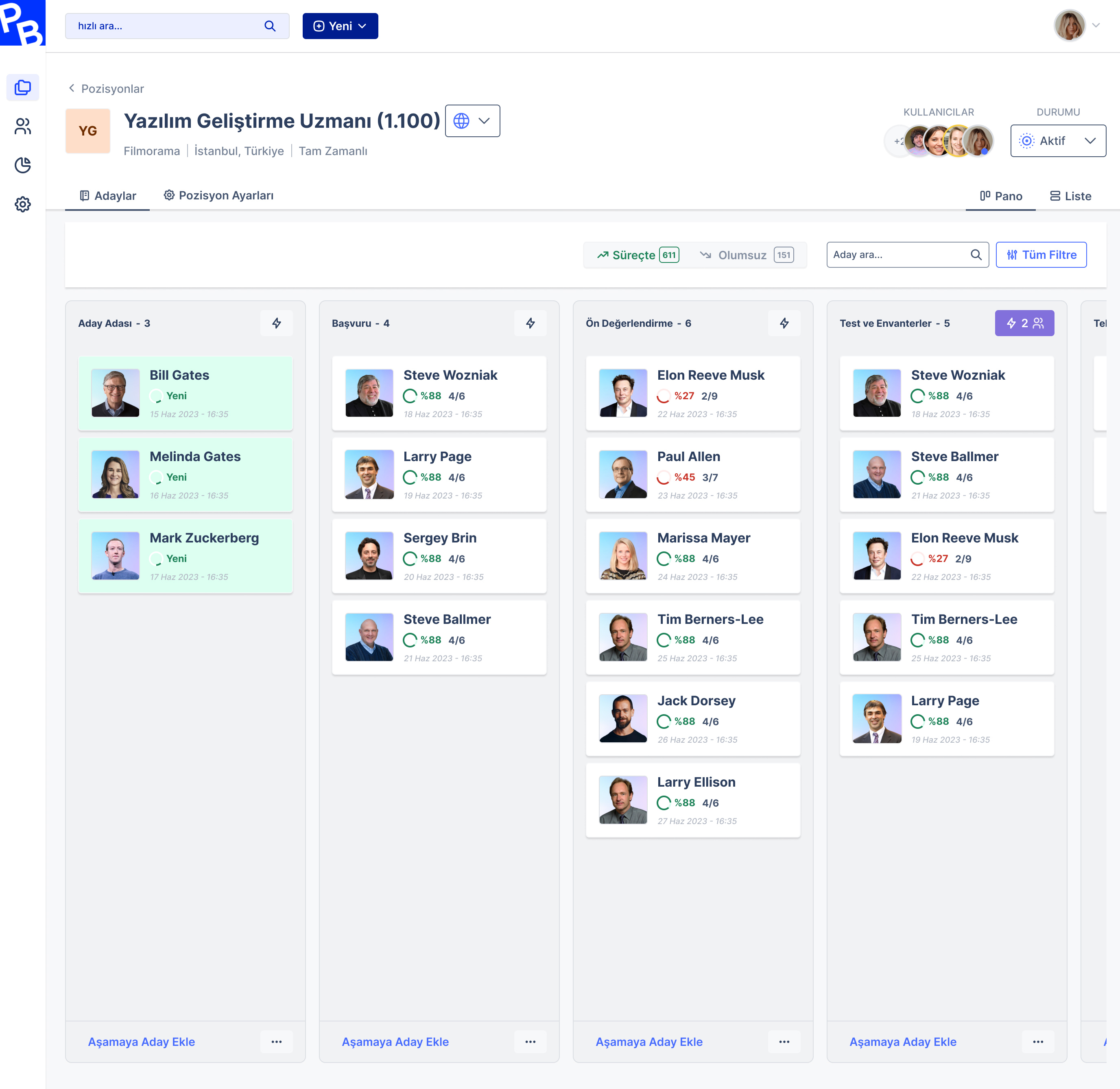
One of the most frequent requests we've heard from users: make the process and candidates more visible on a single screen. We heard you. With our new kanban board view, you can see your entire process at a glance. Which stage your candidates are at, who's waiting where, all visible in one look. Click on any candidate to see their status, and when you want to take action, the control panel gives you access to all detailed operations.
Simplified Candidate Statuses
Previously, we had a detailed status filter that was always visible. In the new world, a candidate has two basic statuses in a position: In Process or Rejected. The kanban board shows only active candidates, so you can focus on the highest-potential candidates who can close the position through the tasks to be completed.
As always, rejected candidates and rejection reasons are just two clicks away. With new filters, you'll be able to see your position status very quickly.
Redesigned Filtering System
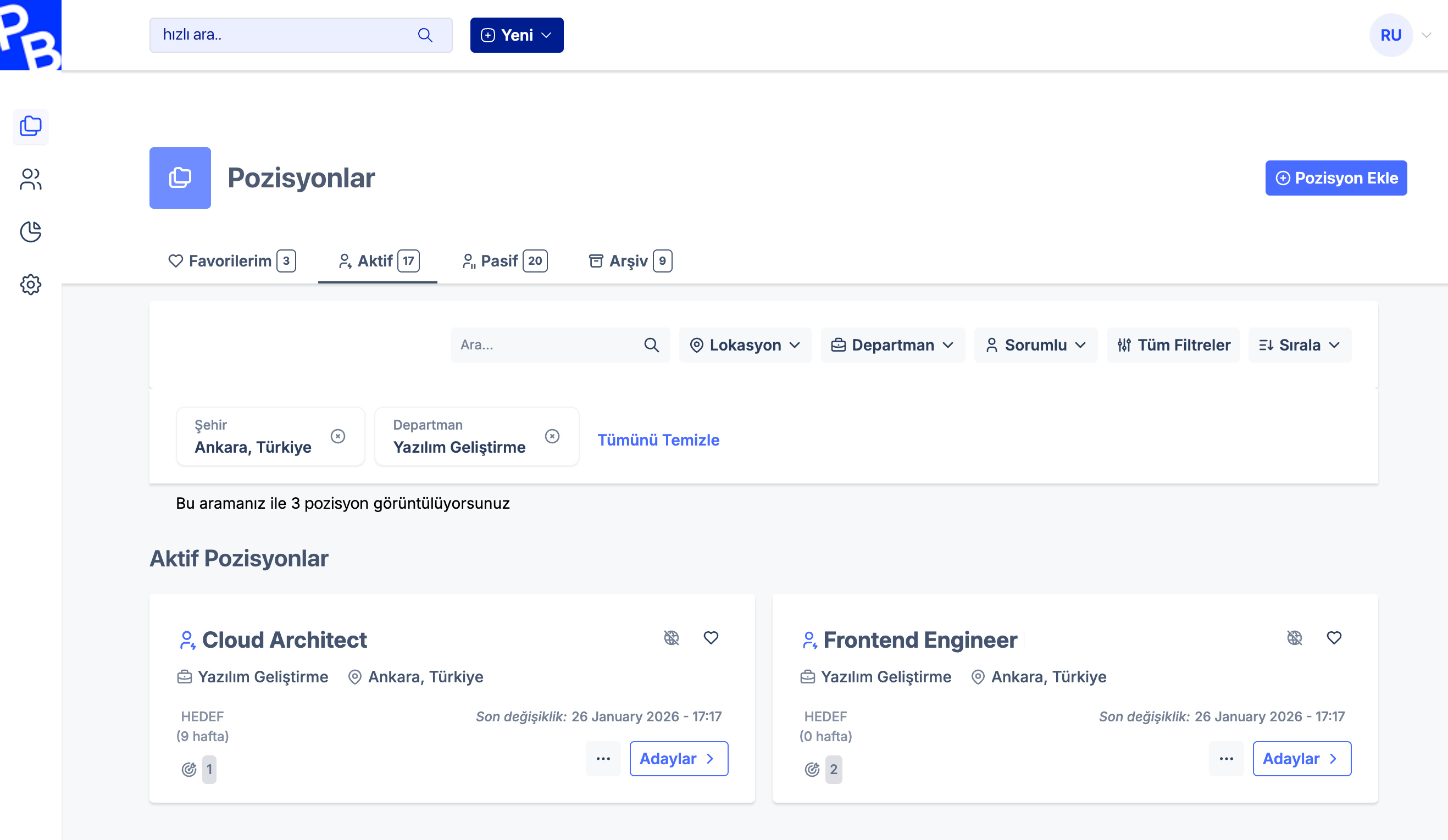
Perhaps the feature we've worked on most, and one we believe will speed you up considerably, is the new filtering system. Whether you're on the Positions screen, viewing a position's candidates, or in the talent pool, the filtering works exactly the same way. In a few clicks, you can reach any candidate or position you want. Change filter options and see results instantly, and save your frequently used filters to the system.
Reporting Center
Another topic that stood out in our user conversations was easy-to-use reporting. The new PeopleBox comes with a new reporting center. We're presenting the reports you've requested most frequently in a format where you can view them with a single click. The first of these, available in the beta, is what we call Main Metrics: core recruitment numbers.
But the truly exciting part is that you'll be able to create your own report cards too. Just like favorited position cards (formerly projects) are listed first, your favorite reports will also appear at the top of the reporting center. While we're at it, your favorite reports, favorite positions, and even favorite candidates will be at your service with the ❤️ icon across all listings.
This Is Just the Beginning
We've been working toward this moment for 6 months. But this is just the beginning. You might ask: where's artificial intelligence in all these features? AI now operates at the core of PeopleBox. Right now it's embedded in everything we do, and soon it will be at your fingertips in the moments you need it most.
The new PeopleBox was designed to keep pace with the speed of the talent world. It was designed to grow with you.
We're live with our beta in February. See you soon!
Join the priority waitlist for early access!